
Save 3 Hours a Week Capturing Content Ideas on the Go

If you’re like me, the best ideas don’t come when you’re sitting at your desk staring at a blank page.
They hit you when you’re on the move — walking, driving, or just living life.
The problem is, capturing those ideas can be a hassle.
Pulling out your phone, opening an app, fumbling with typing or voice notes — it interrupts your flow. And worse, you end up wasting hours later listening back to recordings or transcribing your own voice.
I was stuck in that cycle. Every week, I was losing 2-3 hours just managing my raw ideas. It slowed down my content creation because the “capture” part was clunky and time-consuming.
I knew there had to be a better way.
So I built a hands-free iPhone Shortcut workflow that captures my ideas instantly — no typing, no staring at a screen — and sends them automatically to my content idea database.
From there, I can tag, organise, and even pass those ideas through AI tools to turn them into posts, newsletters, or articles.
Here’s how it works — and how it saved me hours every week.
Why Waiting for Inspiration Kills Productivity
First, a quick mindset shift.
Most of us think we need to sit down, focus, and wait for inspiration. But in my experience, that’s a trap.
When you wait for inspiration, you end up staring at a blank screen, waiting for “the perfect idea.” That’s wasted time and mental energy.
The truth? Inspiration strikes in bits and pieces, often when you’re doing something else. The key is capturing those fragments immediately and effortlessly — so you don’t lose the spark.
The Problem With Traditional Idea Capture
Before I built this workflow, I tried:
Taking notes on my phone, but typing slows me down and breaks my flow.
Recording voice notes, but then I had to spend hours listening back and transcribing.
Using random apps, but switching between them was distracting.
None of these felt seamless.
I needed a system that works hands-free and automatically — so I could focus on the ideas, not the tools.
My Hands-Free iPhone Shortcut Workflow
Here’s exactly what I built — and how it works step by step.
Step 1: Trigger the Shortcut Instantly
I say, “Hey Siri, capture idea,” or tap the Shortcut icon on my phone. The voice recorder starts right away. No unlocking the phone, no searching for an app. It’s simple and fast.
Step 2: Speak Your Idea — No Screen Needed
I just talk. Whether I’m walking the dog, cooking dinner, or in the car, I can record my thoughts aloud. This frees me from typing and lets me capture ideas in the moment — where they’re freshest.
Step 3: Automatic Transcription
When I finish speaking, the shortcut sends the transcript to my database. In seconds, my voice note turns into text. This step is a game changer because it saves me hours of manual transcription.
From there, I can:
Tag ideas by topic or urgency
Prioritise what to work on next
Use Airtable’s integration with AI tools to expand ideas into drafts
This turns raw thoughts into ready-to-use content assets, without extra work.
What content database?
I chose Airtable because it’s flexible and easy to use. It’s like a spreadsheet but way more powerful for organising ideas.
Some benefits:
Easy to search and filter ideas
Customisable views (Kanban, grid, calendar)
Integrates with AI tools to automate content creation
Accessible on desktop and mobile
You can replicate this with other tools if you prefer like Monday, Notion, Trello, etc... My suggestion is to pick one that can be easily integrated with other tools
How Much Time Does This Actually Save?
Here’s the real proof:
Before: 2-3 hours per week spent listening back and transcribing
After: Zero manual transcription, instant capture, and automatic organisation
Result: More time to focus on writing and growing my business
That adds up to entire extra days each month just freed up.
How You Can Build This Too
If you want to try this system, here’s a simple guide to get started - the guide is based on iOS but you can achieve the same with Android.
This is an overview of how it works:
Create a voice memo
Generate transcript - use the native transcription function (if you don't have the latest iOS you can use an app like ChatGPT.
Copy transcript to clipboard
Launch shortcut (or routine with Android)
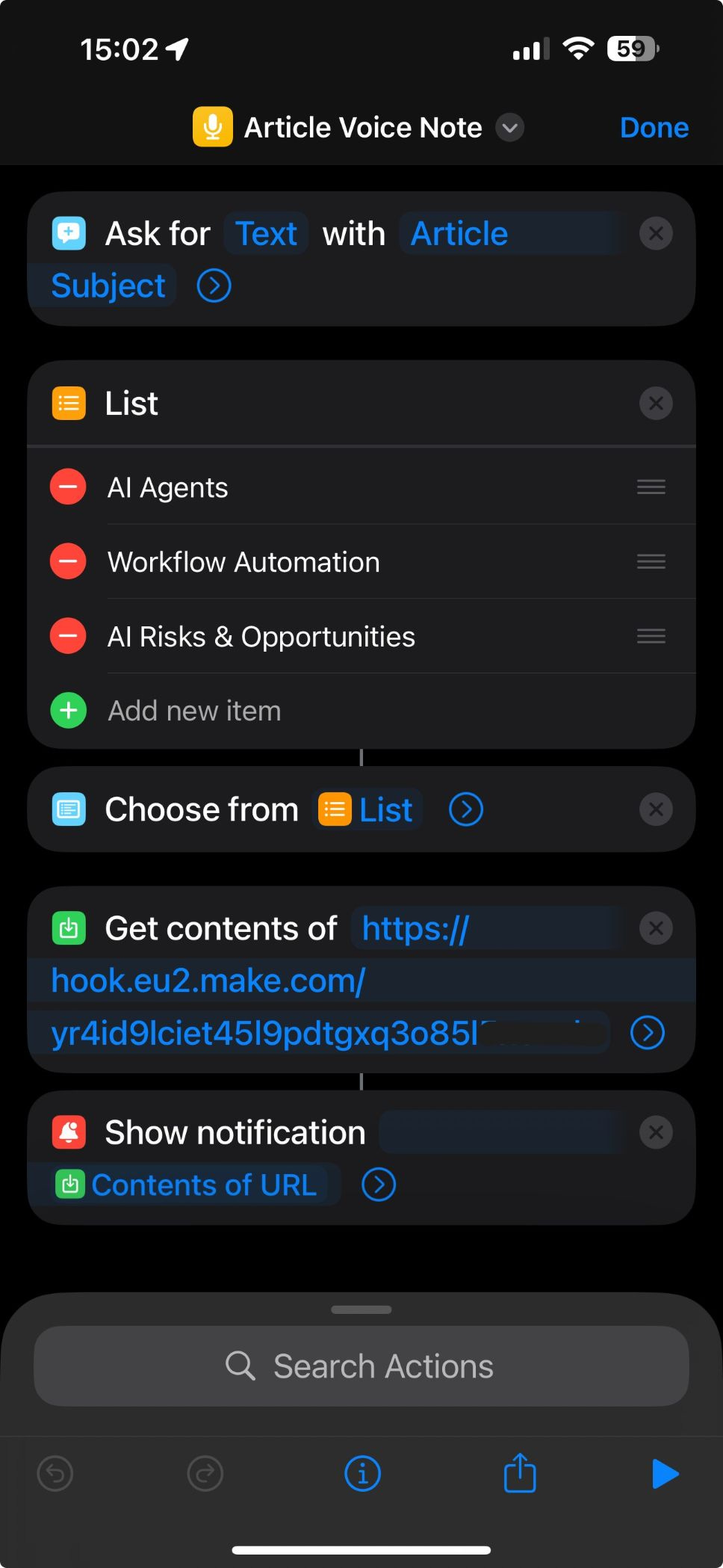
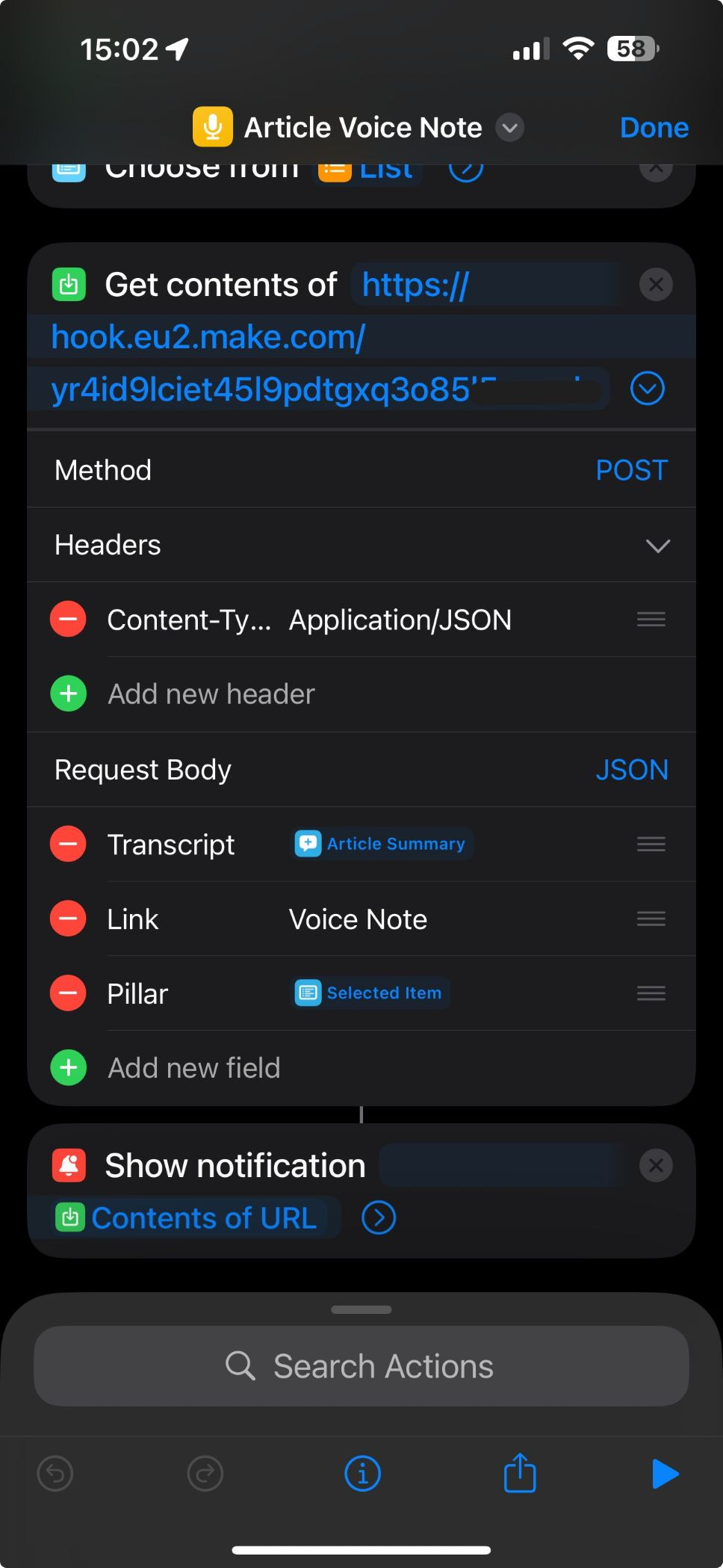
Building a shortcut (iOS) or routine (Android):
- Create a new shortcuts (or routine if you use Android)
- Add a "Ask for input" module so you can paste the clipboard
- Add a "Get contents of URL" module to pass the text to n8n/Make
- Add a "Show notification" module to get a confirmation that the automation ran suvvessfully
- Optional - add as a Home-screen widget for one-tap access.
Now, whenever inspiration strikes, just invoke Siri or tap your widget—your voice note is transcribed and stored in Airtable instantly.
A Few Tips From My Experience
Keep it simple at first — don’t overcomplicate the Shortcut or Airtable setup. Start basic, then improve as you go.
Use voice activation — it’s the fastest way to capture ideas without stopping your flow.
Schedule regular idea review sessions — otherwise, ideas pile up and get lost.
Combine with AI — once ideas are in Airtable, use AI tools to speed up content creation even more.
Final Thoughts
This system isn’t magic. It’s just a simple, practical fix to a common problem.
If you’re like me, losing hours each week staring at screens or transcribing voice notes, hands-free capture could free up your time and creativity.
Better yet, it gives you a consistent pipeline of ideas ready for content creation — without the usual friction.
Make sure you subscribe if you are interested in automating your content management and lead generation workflows with AI and no-code automation.
Till next time,
Andrea